Diary
Create an appointment from the callback request when a visit is agreed.
For the calls you can’t take
Keep your existing number. When you can’t answer, Simple247 gathers what the caller needs so you can call back prepared.
Your number. Your customers. Monthly plans.
The video couldn’t load. You can read how it works below.
Built for UK sole traders and one-person businesses. Made by Blueboot Apps in York.
How it works
For plumbers, gardeners, hairdressers, dog groomers and other one-person businesses. No website needed.
Answer as normal when you can. Only unanswered, busy or unreachable calls are forwarded to Simple247, using the diversion you set up with your provider.
Mobile callers get a text: a link to a short AI chat on Basic, or a conversation by text on Advanced. Voicemail gives callers another way to leave a message.
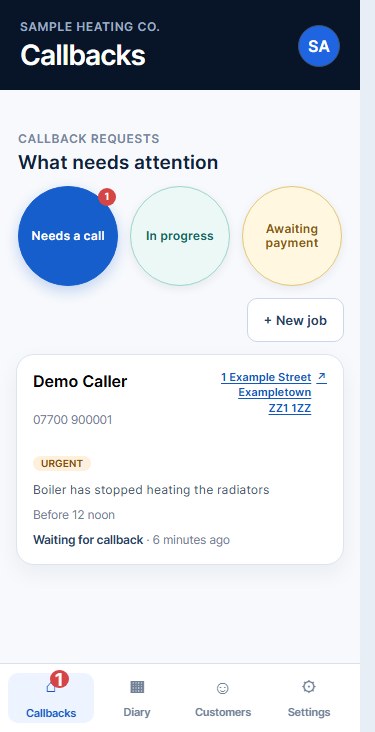
Open the callback request to see what they need, where they are and when they’d like a call. Choose how you hear about new requests in Settings.
From enquiry to action
The problem, the place and the best time to call, together in one request. Call or text, add a note and record what happened.
After the callback
Create an appointment from the callback request when a visit is agreed.
Completed work stays with the customer record for useful context next time.
Record job values and payments. See work won, money collected and what’s still owed in Finance.
Add your Google review link and choose when to send one request after a completed job, by email or text.
Choose how callers reply
Both plans include your Simple247 diversion number, callback dashboard, voicemail transcripts, diary, customer history, finance overview and scheduled Google review requests.
£19per month
The caller opens a link from your missed-call text and chats in their browser. If they cannot continue online, they can leave a voicemail instead.
The caller needs an internet connection for the chat.
£35per month
The caller replies directly by text. The conversation stays in SMS, with no link to open. Callers who cannot continue by text can leave a voicemail instead.
No browser or app for the caller to open.
Monthly subscriptions. Cancel any time. Check diversion availability and charges with your phone provider before subscribing. Questions about your expected call or message volume? Talk to us first.
Payment is handled by Stripe for Blueboot Apps, the maker of Simple247. By subscribing you agree to our Terms and Privacy Policy.
Getting started
Unsure about your phone provider? Ask us before you subscribe.
Ask about my setupUse your account setup email to add your business details and customise your assistant.
Find your allocated Simple247 number in your account. Most mobiles can turn on call forwarding themselves in a couple of minutes — your account shows the exact steps for your phone.
When your number is ready, you can call your usual business number and let it ring out. This is optional; your first real missed call can confirm the route.
Set email, text or device notifications in Settings and check you receive them. Need a hand? Contact support.
A few useful answers
Want to talk through your number or provider first?
Ask a setup questionNo. Customers keep calling the number they already know. You conditionally divert only unanswered, busy or unreachable calls to your Simple247 number.
You need a provider that supports forwarding unanswered, busy or unreachable calls to your allocated Simple247 number. Ask your provider about availability, setup instructions, charges and what happens to your existing voicemail. If you’re unsure, contact us before subscribing.
No app is needed. Basic uses a link to a browser chat, so the caller needs an internet connection. Advanced uses ordinary SMS replies. Voicemail is also available for callers who cannot continue by text.
It depends on your phone provider and number allocation. Adding your business details is only the first step: you also need to configure diversion and test it. Contact support if your number or setup email hasn’t arrived, or you need help getting started.
Your plan includes the Simple247 assistant number, missed-call follow-up, voicemail transcription, dashboard, diary, customer history, Finance overview and the features listed for that plan. Your phone provider may charge separately for call diversion; ask them about availability and rates before subscribing. The price shown is what you pay — Blueboot Apps is not VAT registered, so no VAT is added. The subscription is billed monthly through Stripe.
The call continues normally. Simple247 is involved only when the network follows your conditional diversion.
Landline and withheld callers can leave voicemail instead of using text. Withheld callers are asked to include a contact number. The message is transcribed into the callback request.
No. It gathers practical details for your callback. It does not diagnose, quote, promise attendance or book the work.
Yes. The callback request provides Call and Text actions. You record whether you reached the caller and the eventual outcome yourself.
No. Simple247 works from your phone number and the Simple247 dashboard. A website is not required, and if you already have one, nothing about it needs to change.
Simple247 is designed for sole traders and one-person businesses, whether you travel to customers or they come to you. Add your services and coverage to the assistant’s instructions. Ask us if you have particular requirements.
Yes. Add your Google review link and turn on automatic review requests in Settings. For an eligible completed job, Simple247 sends at most one scheduled request using the email or SMS route you choose.
Yes. Both plans are monthly and can be cancelled any time from the billing portal in your account. Cancellation stops future billing and does not refund the current billing period. Before your Simple247 number stops working, remove its diversion with your phone provider so calls no longer forward to it.
Missed-call cover, ready when needed